<link rel="stylesheet" href="https://unpkg.com/sweetalert2@latest/dist/sweetalert2.min.css">
<script src="https://unpkg.com/sweetalert2@latest/dist/sweetalert2.min.js"></script>
js:
Swal.fire({ title: '', text: '请选择项目状态', icon: 'warning', confirmButtonText: '确定' });
Swal.fire({ title: ' ', text: msg, icon: 'success', confirmButtonText: '确定' }).then(function () { window.location.href = 'Test.aspx' });
asp.net
Page.ClientScript.RegisterStartupScript(this.GetType(), "a", "Swal.fire({title: '修改成功!',text: '请使用新密码登陆。',icon: 'success',confirmButtonText: '重新登陆'}).then(function(){window.location.href = 'index.aspx'});", true);
Page.ClientScript.RegisterStartupScript(this.GetType(), "a", "Swal.fire({title: '',text: '" + ex.Message + "',icon: 'error',confirmButtonText: '确定'});", true);
弹出提示 无按钮
Swal.fire({
position: 'center', //定位 左上角
icon: 'info',
title: '正在提交第' + id + '张',
showConfirmButton: false,
allowOutsideClick: false
})
无按钮2秒后关闭
Swal.fire({
position: 'center',
icon: 'info',
title: '正在提交第' + id + '张',
showConfirmButton: false,
allowOutsideClick: false,
timer: 2000 // 新增此行,单位毫秒
})
timerProgressBar: true//关闭进度条
2秒后跳转
Swal.fire({
position: 'center',
icon: 'info',
title: '正在提交第' + id + '张',
showConfirmButton: false,
allowOutsideClick: false,
timer: 2000 // 2秒后关闭弹窗
}).then(() => {
// 弹窗关闭后触发跳转(替换为你的目标URL)
window.location.href = "https://your-target-url.com";
});
// 'success'、'error'、'warning'、'info'、'question'
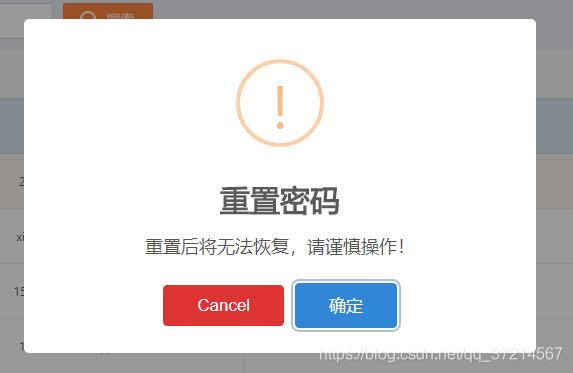
Swal.fire({
icon: 'warning', // 弹框类型
title: '注销帐号', //标题
text: "注销后将无法恢复,请谨慎操作!", //显示内容
confirmButtonColor: '#3085d6',// 确定按钮的 颜色
confirmButtonText: '确定',// 确定按钮的 文字
showCancelButton: true, // 是否显示取消按钮
cancelButtonColor: '#d33', // 取消按钮的 颜色
cancelButtonText: "取消", // 取消按钮的 文字
focusCancel: true, // 是否聚焦 取消按钮
reverseButtons: true // 是否 反转 两个按钮的位置 默认是 左边 确定 右边 取消
}).then((isConfirm) => {
try {
//判断 是否 点击的 确定按钮
if (isConfirm.value) {
Swal.fire("成功", "点击了确定", "success");
}
else {
Swal.fire("取消", "点击了取消", "error");
}
} catch (e) {
alert(e);
}
});
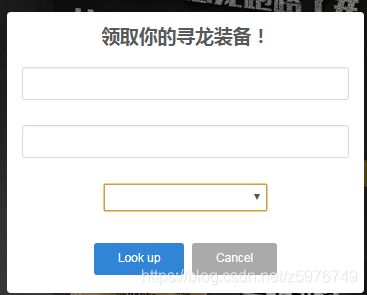
Swal.fire({
title: '领取你的寻龙装备!',
input: 'select',
html:
'<input id="swal-input1" class="swal2-input">' +
'<input id="swal-input2" class="swal2-input">',
inputAttributes: {
autocapitalize: 'off'
},
showCancelButton: true,
confirmButtonText: 'Look up',
showLoaderOnConfirm: true,
preConfirm: (login) => {
return fetch(`//api.github.com/users/${login}`)
.then(response => {
if (!response.ok) {
throw new Error(response.statusText)
}
return response.json()
})
.catch(error => {
Swal.showValidationMessage(
`Request failed: ${error}`
)
})
},
allowOutsideClick: () => !Swal.isLoading()
}).then((result) => {
if (result.value) {
Swal.fire({
title: `${result.value.login}'s avatar`,
imageUrl: result.value.avatar_url
})
}
})
var content = "无记录";
var msg=""; //msg 是从外面传入的数据
if (msg) {
content = "<p style='color: red'>最近一次操作后的5小时内有效</p> "
+ "<p>可以使用 Ctrl +F 查找关键字</p>"
+ "<table class='table_list'>"
+ "<tr>"
+ " <th class='js_tr_data'> 时间</th> <th>名称</th> <th>密码</th>"
+ "</tr>"
+ msg
+ "</table>"
}
Swal.fire({
title: '<strong>记录</strong>',
icon: 'info',
html: content, // HTML
focusConfirm: true, //聚焦到确定按钮
showCloseButton: true,//右上角关闭
})
带有定位 和 消失时间的 弹框
Swal.fire({
position: 'top-end', //定位 左上角
icon: 'success',
title: 'Your work has been saved',
showConfirmButton: false,
timer: 1500
})
自定义 第三方 css 的 弹框 (推荐使用 Animate.css )
Swal.fire({
title: 'Custom animation with Animate.css',
animation: false,
customClass: 'animated tada'
})
右上角 通知类 弹窗
Swal.fire({
toast: true,
position: 'top-end',
showConfirmButton: false,
timer: 3000,
icon: 'success',
title: 'Signed in successfully'
})
如何 做 一个自己的 通用模版
//定义模版 (可多次使用)
var MyBox = Swal.mixin({
toast: true,
position: 'top-end',
showConfirmButton: false,
timer: 3000
});
//调用
MyBox.fire({
icon: 'success',
title: 'successfully'
});